Zum Inhalt springen
WEPPY
WEPPY Roblox AI Toolkit

Entwickle Roblox-Spiele in Studio mit KI.

ÜbersichtInstallierenDokumentationPreise
Community
Community

Teile Roblox-Spiele, spielt gemeinsam und tauscht Feedback aus.

Game postsTips and examplesIssues and feature requestsNotices and events
  • English
  • 한국어
  • 日本語
  • español
  • português (Brasil)
  • Indonesia
  • Deutsch
  • français (France)
Sign in
My licenses My posts Activity
Account settings

Support information

WEPPY Roblox AI Toolkit

Entwickle Roblox-Spiele in Studio mit KI.

ÜbersichtInstallierenDokumentationPreise
Community

Teile Roblox-Spiele, spielt gemeinsam und tauscht Feedback aus.

Game postsTips and examplesIssues and feature requestsNotices and events

WEPPY-Workflow-Notizen

Entwicklungsblog

Praktische Abläufe, um Roblox-Erlebnisse mit KI zu erstellen, das Ergebnis in Studio zu prüfen und die sichtbare Spielerfahrung zu verbessern.

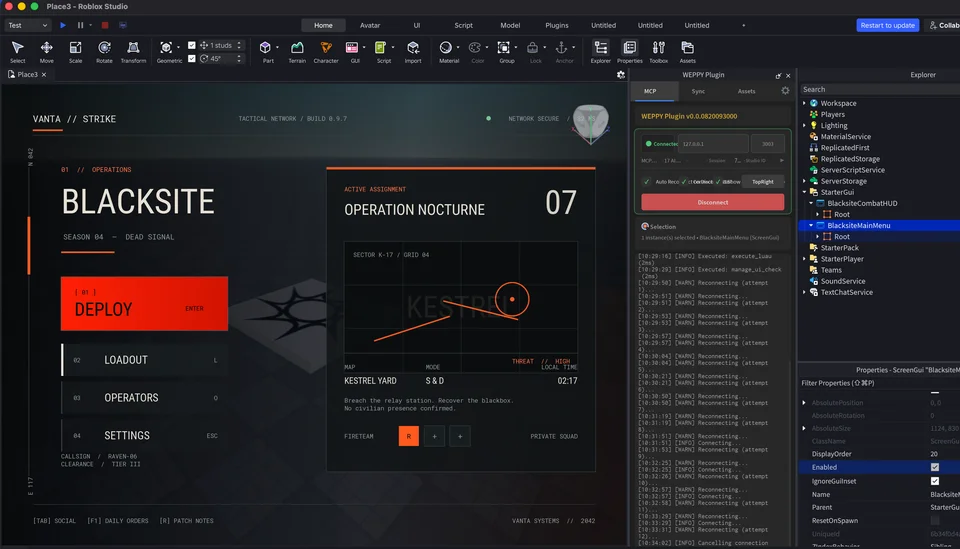
Von einem KI-Agenten erstelltes Hauptmenü eines Taktikspiels in Roblox Studio mit verbundenem WEPPY
WEPPY Workflow · EP. 01

Roblox-UI mit KI erstellen

UI mit WEPPY erstellen, auf verschiedenen Bildschirmgrößen prüfen und generierte Bilder anwenden

Erfahren Sie, wie ein KI-Agent mit WEPPY Roblox-UI erstellt, Bildschirm- und Eingabeprobleme prüft und generierte Bilder über Open Cloud hochlädt und in Studio anwendet.

20.08.2026

WEPPY

Links

  • Dokumentation
  • Installieren
  • Tarife
  • Blog
  • Kontakt
  • GitHub
  • Explore games
Privacy PolicyTerms of Service