
Three Ways to Build a Roblox 3D Model, Tested on One Mine Golem
Back to boardI needed a boss to greet players at the entrance to an abandoned mine. One arm had to look unusually heavy even from a distance, and up close, players would see amber eyes beneath its stone brows. Before building it, I had one question. When I have this clear a picture in my head, how much of it can I convey in words?
Building the Golem Without a Reference Image
Here’s the brief the three methods had in common.
Make a rock golem for an abandoned mine dungeon. Its right fist should hang close to the floor, and three purple crystals should jut out behind its left shoulder. Show two amber eyes beneath its stone brows.
For the first round, I used text alone. In the three models below, look at the hand on the left side of the image. That’s the golem’s own right hand.
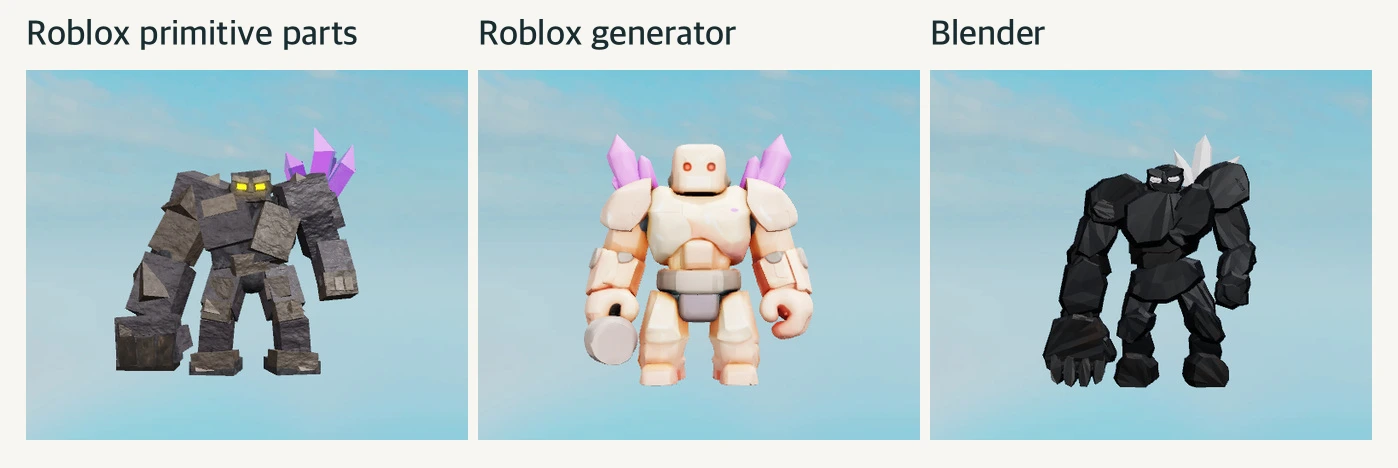
Roblox primitive shapes. I assembled the golem from Studio’s basic blocks and wedges, and it was immediately clear which arm was built for mining. The oversized fist looks like a single rectangular chunk of rock, and if you want to lower the elbow or enlarge the fist, you can adjust that piece on its own. It’s a good first model for testing where the boss will stand and how far its attacks will reach.
Roblox generator. I used WEPPY to send the description to GenerationService, Studio’s built-in 3D generation service. The golem in the middle has rounded shoulders and knees and clearly defined body segments. The gray rock at the end of its right arm looks more like a hammer held in a small hand than a giant fist. That’s how the generator interpreted “mining fist” on this run.
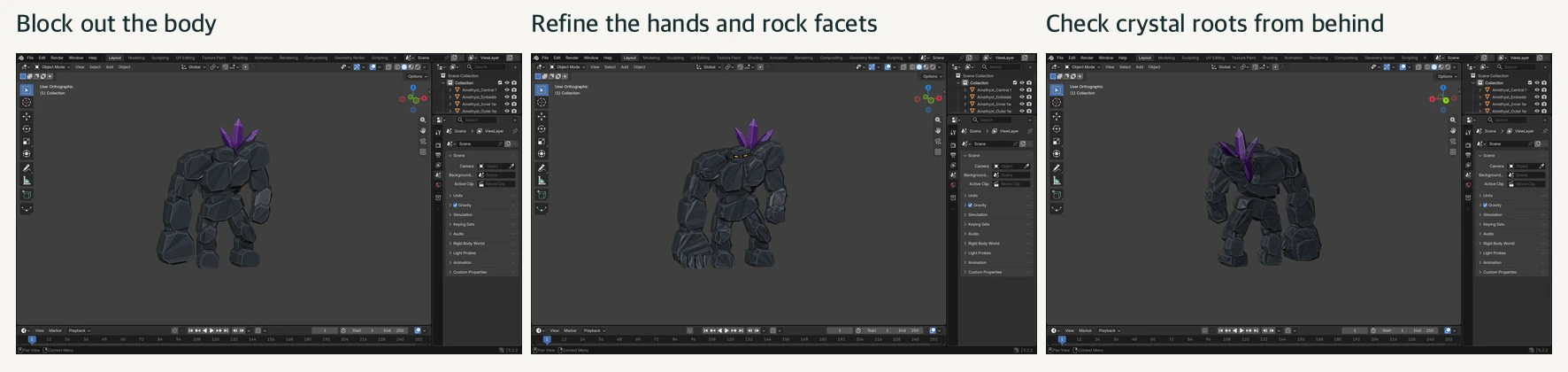
Blender. I ran AI-written code in Blender to shape the torso and limbs from several chunks of rock. On the rightmost model, you can see finger joints at the end of the long arm. This method also lets you turn the model around and refine exactly where the crystals emerge from its back. The screenshots below show the actual Blender workspace during the text-only round.
Adding One Front-View Reference of the Same Golem
Here’s the image I added. The right fist hangs almost to the top of the foot, and the purple crystals fan outward from the opposite shoulder. The text simply called for a “large fist.” In the image, you can see how much bigger it is than the head and how close the fingertips come to the foot.
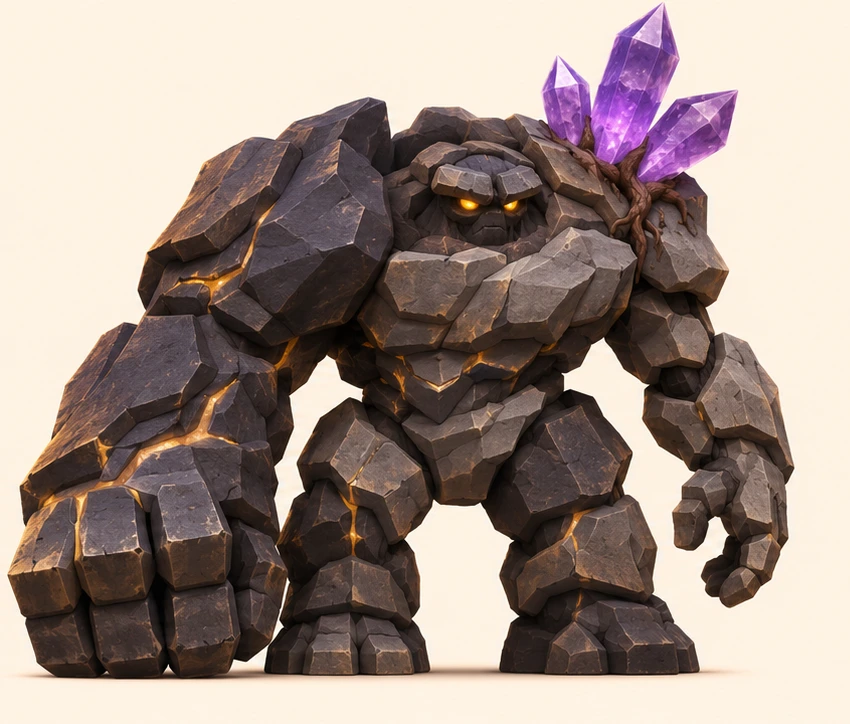
I used the same image for all three methods. For the primitive shapes and Blender versions, the AI designing the model saw the image. For the Roblox generator, I used a development build of WEPPY to pass in the reference’s Roblox image ID so the generator received both the image and the text.
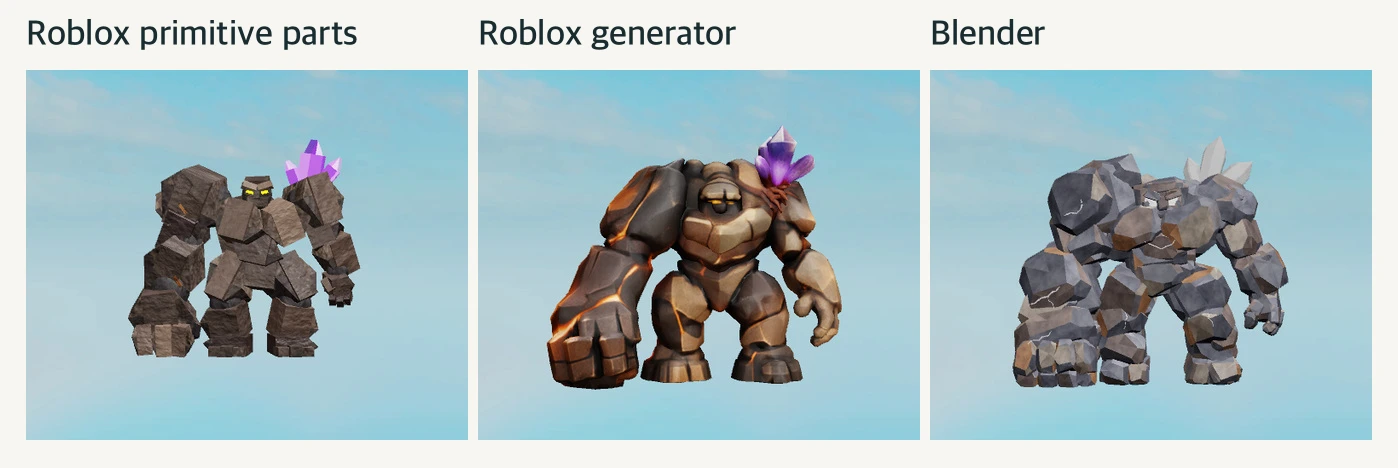
Roblox primitive shapes. The right fist hung lower, and the body leaned toward it. I made three versions per condition, each about 10 studs tall. The gap between the bottom of the fist and the floor was 0.18–0.23 studs with text alone and 0.06–0.14 studs when I added the reference to the same building instructions. Measuring in studs, Roblox’s unit of length, made it clear that the pose changed more than the number of rocks did.
Roblox generator. This time the arm itself was thicker, and the fist reached down beside the foot. The other hand was smaller and higher, so the difference in weight between the arms read clearly even from the front. I made three requests with the image, and only one produced a model. Some of the wording I actually sent to the generator also differed from the text-only round. The middle image shows that one successful result.
Blender. Two of the three models made with the reference had broader shoulders and fists. They came in at 11,027 and 10,760 triangles, respectively, both above the 10,000-triangle target for this build. Once the reference gives you the bulk you’re after, the next step before putting the model in your game is to see which faces you can simplify while keeping that silhouette.
All Six Results at a Glance
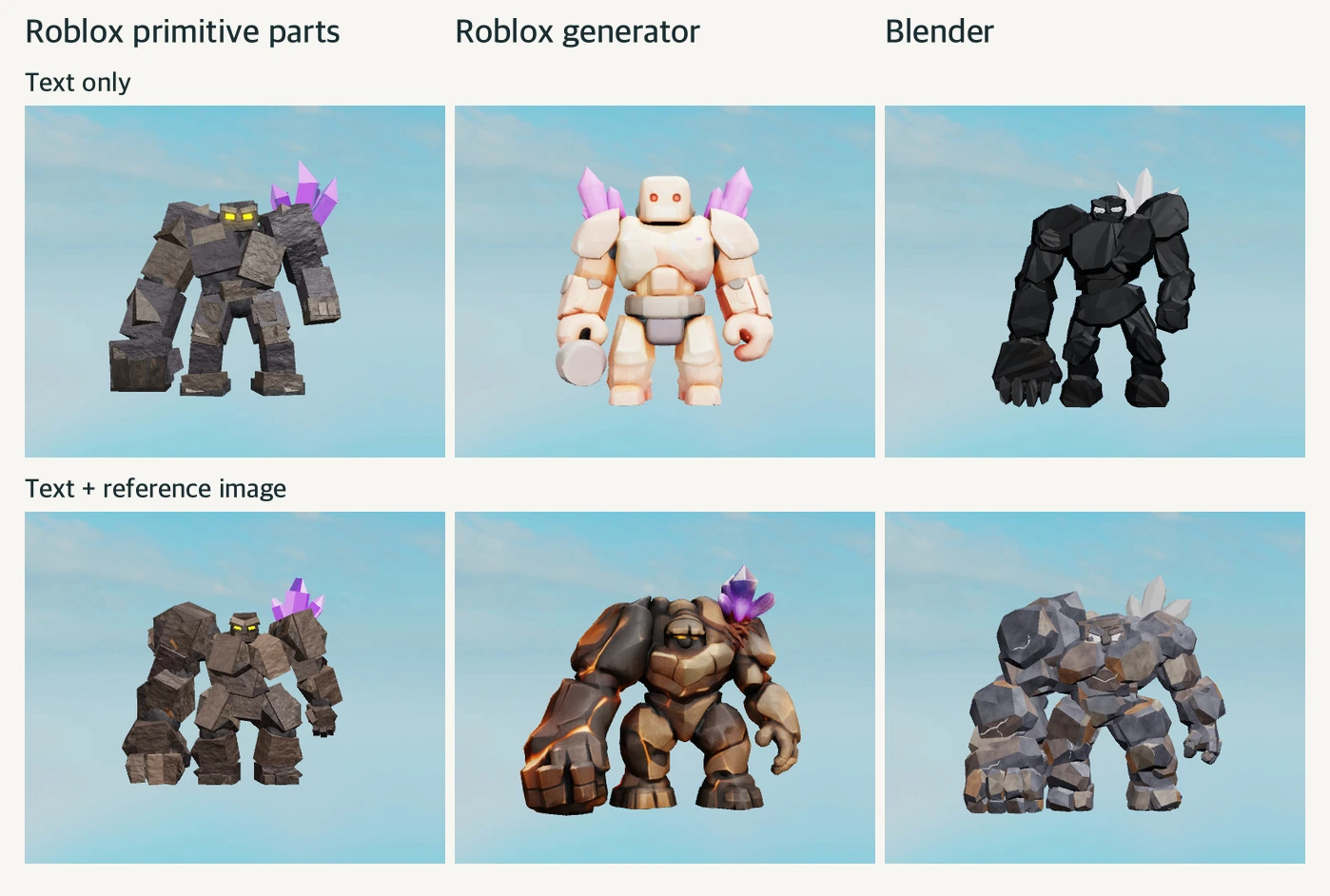
Looking down each column, the first thing I notice is the gap beneath the fist on the primitive-shape models, the difference in arm thickness on the Roblox-generated models, and the silhouette from shoulder to fist on the Blender models. I photographed all six in Studio with the same front lighting and adjusted the camera distance for each model’s height. The images are framed to compare shapes rather than show how large the models would look in-game.
Next time I brief a similar boss, I’ll start with a reference drawing that shows the pose I want players to recognize at a glance. For this golem, it did more than adding “high quality” to the prompt could have. It showed exactly how low the fist should hang.
The Eyes I Saw in Blender Disappeared in Studio
Once I’d settled on a shape, it was time to see it under the game’s lighting. On a Blender golem I reviewed separately, the eyes looked amber in the editor. Once I brought it into the abandoned mine, they turned pale gray and blended into the shadow under the brows. The rock surface pattern was unchanged, so I could have missed the difference if I’d only looked at the torso.
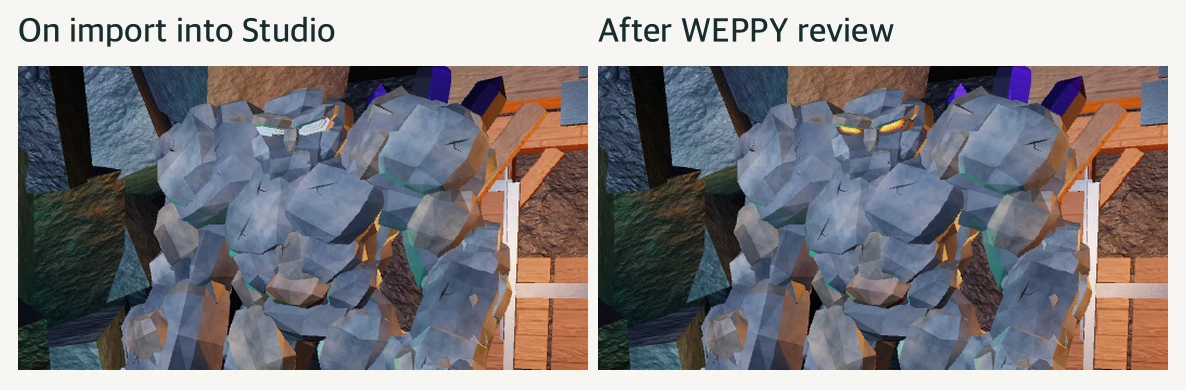
I used WEPPY to inspect the Studio properties and found that the eyes, their highlights, and their rims were all the same gray (#A3A2A5). I restored the original amber, bright yellow, and dark rim colors, then took another shot in the same spot. In the photo on the right, you can see where the eyes end and the brows begin again. The color edits were enough to fix it.
Once you’ve chosen a model for your game, you can ask WEPPY to upload it to Roblox. WEPPY registers it through Studio with the appropriate asset type and returns the asset ID. That lets you compare candidates locally while you build them and upload only the models you’ve finished reviewing.
One Last Comparison With Dedicated 3D Generators
I also pulled out two models I’d already made with dedicated generators A and B using the same front-view reference. The image below shows the front and back of each original model and its lighter, game-ready version.
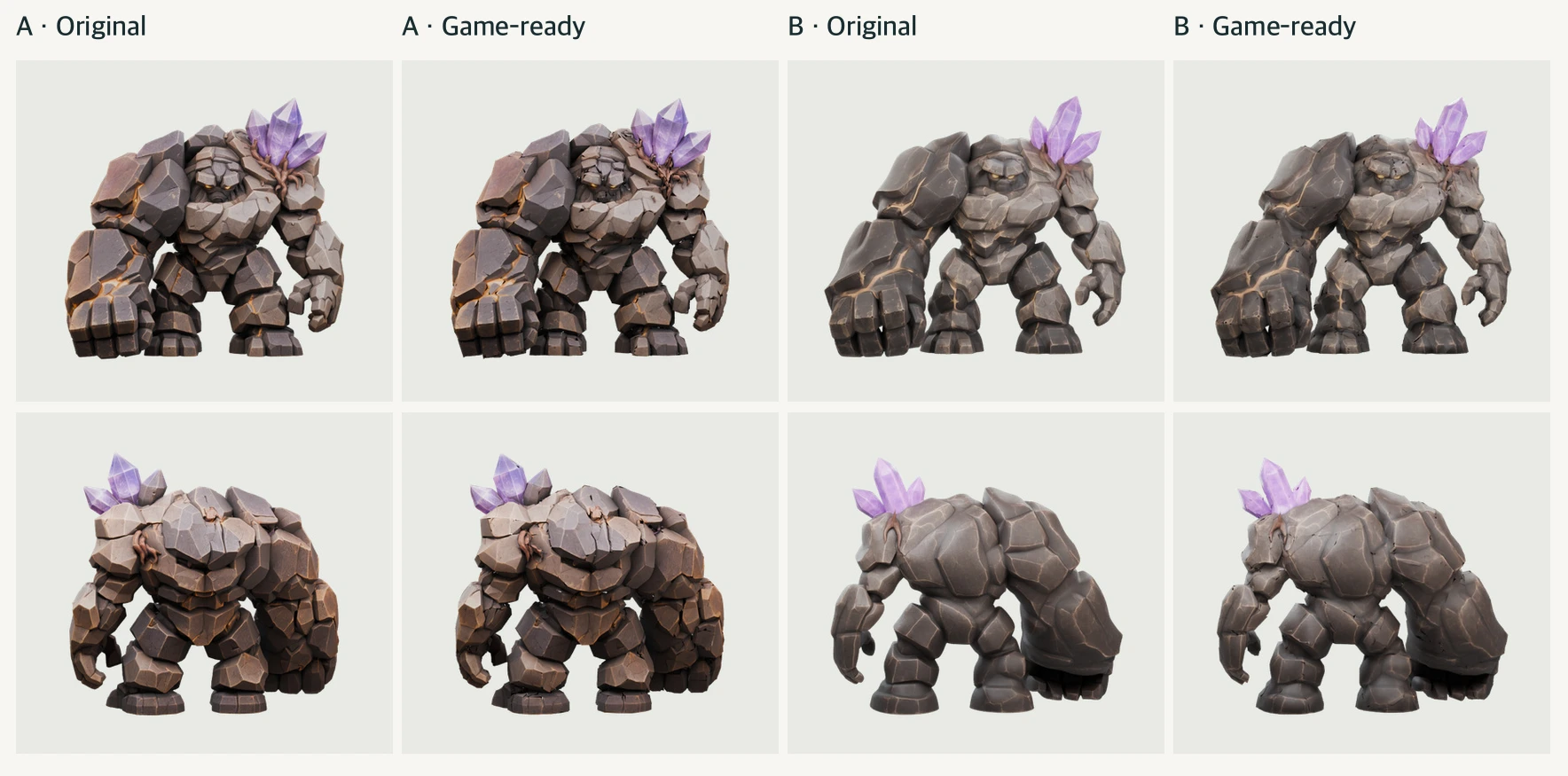
The dedicated generators produced the most detailed finishes in this comparison. A has distinct stone segments even within the oversized fist, and you can see the crystal roots from behind. B’s three bright crystal branches above the shoulder are easy to tell apart from a distance.
Getting those details into the game took some extra work. From the free allowances available at the time, A used 200 points, while B used 10 credits each for geometry and textures. The originals had about 500,000 triangles for A and about 180,000 for B. I reduced each to 9,700 triangles for the game. After the first reduction, the background showed through gaps between the rocks, so I welded the overlapping vertices and simplified the meshes again.
For a first playtest, I’d build the golem from basic parts and check the passage width and attack range first. If I wanted to see a different mesh quickly, I’d use the Roblox generator. If I wanted to shape the fist joints or the back by hand, I’d use Blender. After reviewing the model in-game with WEPPY, I could decide whether it needed more detail. How I spend that modeling time depends on whether players will walk past the golem as a prop or circle behind it to break the crystals on its back.
Model Credits and License
Magma Crystal Golem — u127158805, VARCO 3D. Amethyst Golem — Meshy. Both models were offered under CC BY 4.0 at the time they were generated. For the game-ready versions, I reduced the triangle counts and resized the textures to 1,024 pixels on the longest side.
CC BY 4.0 https://creativecommons.org/licenses/by/4.0/
Meshy https://help.meshy.ai/en/articles/10137554-what-is-the-ownership-of-the-generated-models
VARCO 3D https://3d.varco.ai/