
Skip to content
WEPPY
WEPPY Roblox AI Toolkit

Build Roblox games in Studio with AI.

OverviewInstallDocsPricing
Community
Community

Share Roblox games, play together, and exchange feedback.

Game postsTips and examplesIssues and feature requestsNotices and events
  • English
  • 한국어
  • 日本語
  • español
  • português (Brasil)
  • Indonesia
  • Deutsch
  • français (France)
Sign in
My licenses My posts Activity
Account settings

Support information

WEPPY Roblox AI Toolkit

Build Roblox games in Studio with AI.

OverviewInstallDocsPricing
Community

Share Roblox games, play together, and exchange feedback.

Game postsTips and examplesIssues and feature requestsNotices and events

WEPPY workflow notes

Development Blog

Practical workflows for building Roblox experiences with AI, checking the result in Studio, and improving what players see.

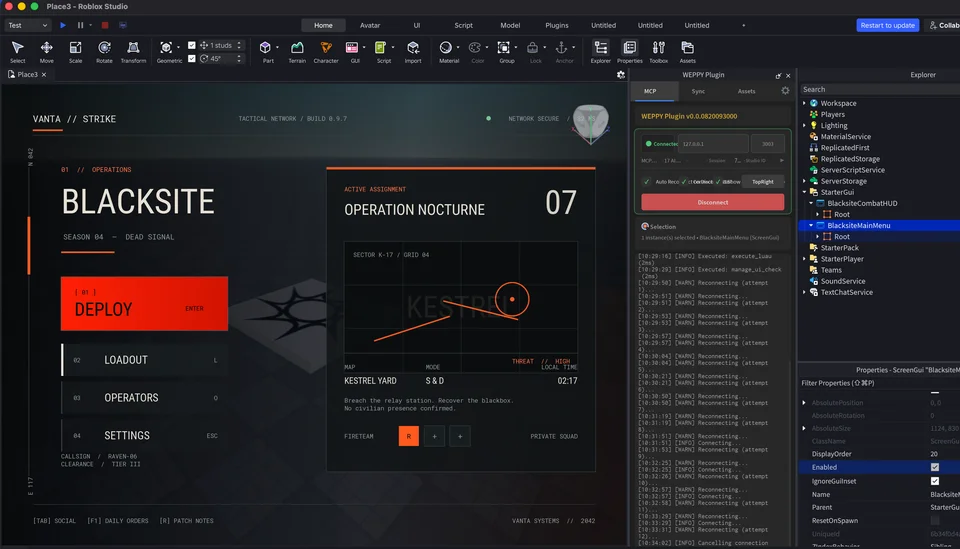
A tactical game main menu created by an AI agent in Roblox Studio with WEPPY connected
WEPPY Workflow · EP. 01

Build Roblox UI with AI

Create UI, review different screen sizes, and apply generated images with WEPPY

Learn how to build Roblox UI with an AI agent and WEPPY, check screen and input issues, then upload generated images through Open Cloud and apply them in Studio.

Aug 20, 2026

WEPPY

Links

  • Docs
  • Install
  • Plans
  • Blog
  • Contact
  • GitHub
  • Explore games
Privacy PolicyTerms of Service