
Sync connects Roblox Studio state with local files so the AI can reliably read and modify the full project context.
Why Sync Matters
Without Sync, the AI only sees fragments of code pasted into the conversation. With Sync enabled, the AI works from the entire project, which makes the following much easier.
- Apply consistent refactoring across multiple scripts
- Quickly review only risky changes based on change history
- Keep a clear direction for which side — Studio or local — is the source of truth
How It Works
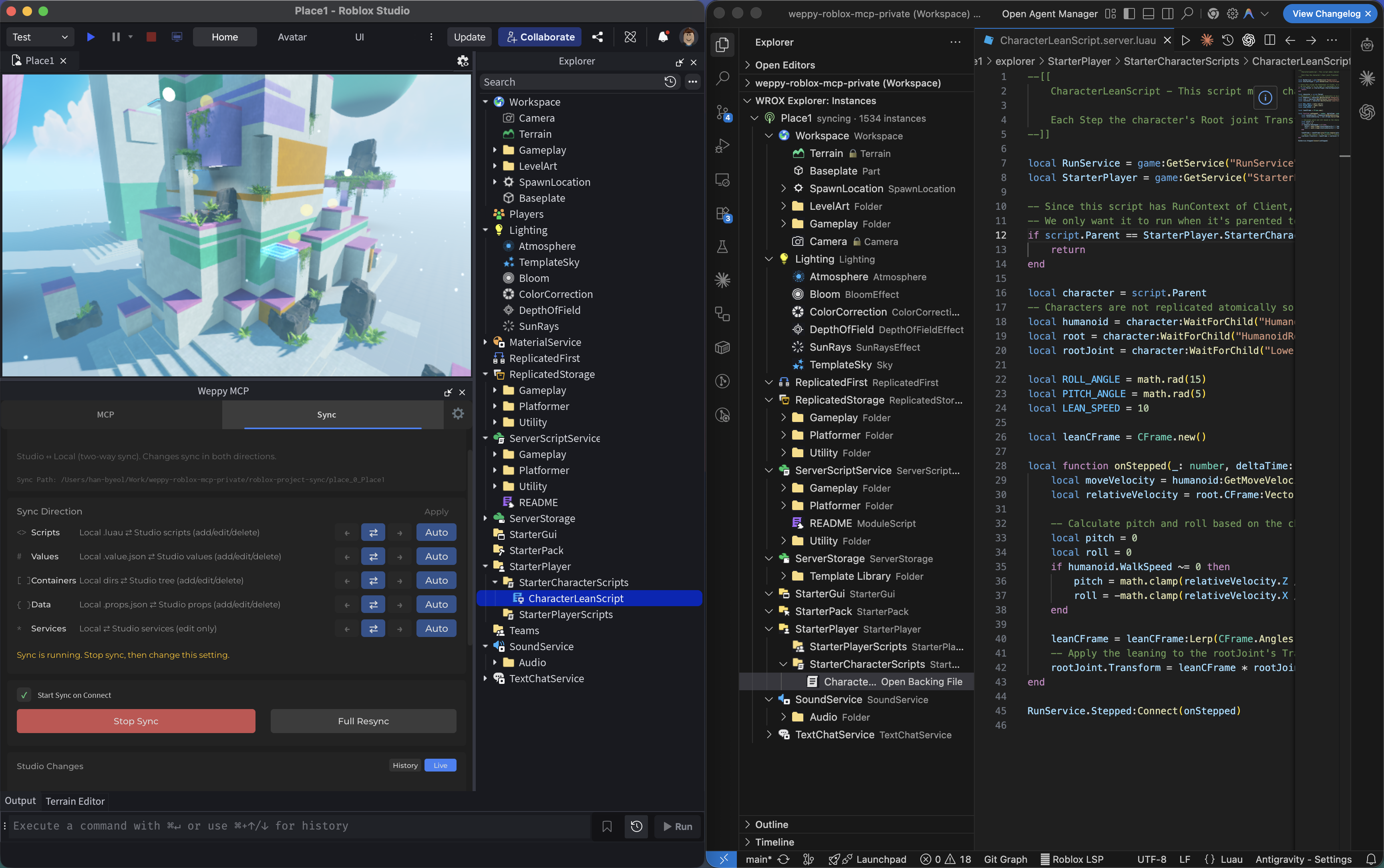
- Full Sync: Initial sync of the Studio tree and instances to a local mirror
- Incremental Sync: Subsequent changes are applied as diffs via change monitoring
- History/Status Tracking: See what changed, when, and in which direction
Sync data is created under {projectRoot}/weppy-project-sync/place_{placeId}/explorer. WEPPY also writes a per-place sourcemap to {projectRoot}/weppy-project-sync/place_{placeId}/sourcemap.json and keeps a canonical root-level file at {projectRoot}/weppy-project-sync/sourcemap.json.
Project Directory Structure and Multi-Place
WEPPY Sync creates a weppy-project-sync/ directory under the project root and maintains a separate mirrored tree for each Place.
weppy-project-sync/
├── sourcemap.json             # Root-level canonical sourcemap (recommended path for luau-lsp)
├── .sync-config.json          # Global configuration (shared by all Places)
├── place_123456/              # Per-Place directory
│   ├── explorer/              # Mirrored workspace (v2 nested format)
│   │   ├── Workspace/
│   │   │   ├── _tree.json
│   │   │   ├── Part/
│   │   │   │   └── Part.props.json
│   │   │   └── MyScript/
│   │   │       └── MyScript.server.luau
│   │   └── ServerScriptService/
│   │       └── _tree.json
│   ├── sourcemap.json         # Per-Place sourcemap
│   ├── .sync-meta.json        # Place metadata
│   └── .sync-index.json       # Hash index (version: 2)
└── place_789012/              # Another Place
    └── ...
Each Place has its own place_XXXXX/ directory. With Pro tier, up to 5 Places can be synced simultaneously; the LRU policy evicts infrequently-used Places from memory (disk data is preserved). This structure ensures that sync state stays isolated when working across multiple games from the same project root.
Browsing Sync Data in VSCode
Installing the WEPPY Roblox Explorer extension lets you navigate the synced instance tree in the same form as Roblox Studio, right inside VSCode. Explorer reads the sync files generated here and additionally reflects real-time sync status and direction info when the local MCP server is running.
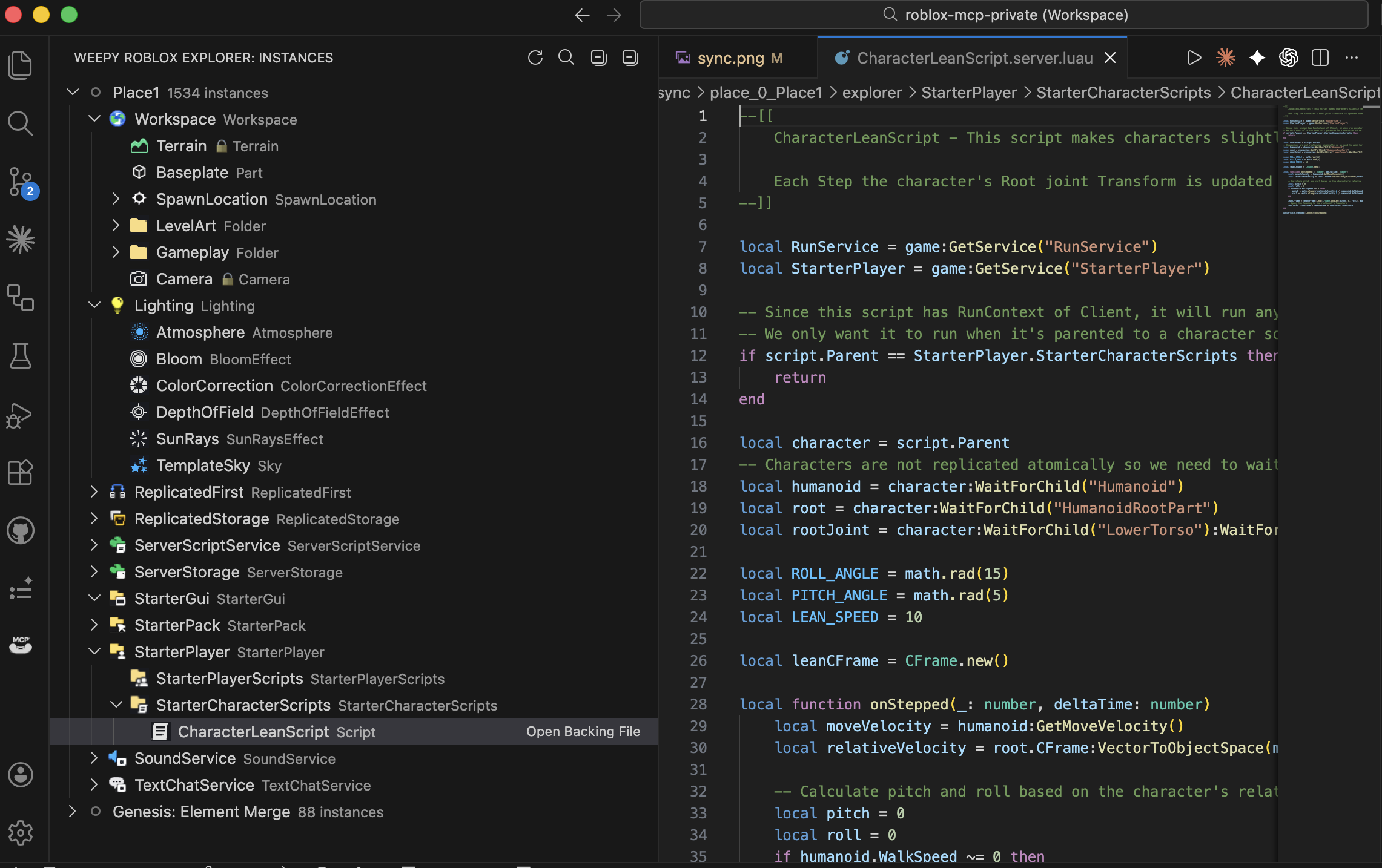
- Shows service / instance tree with Roblox class icons
- Click script files to open and edit them directly
- Sync status badges show changes and conflicts
Basic vs Pro
| Feature | Basic | Pro |
|---|---|---|
| Sync direction | Studio → Local | Bidirectional |
| Per-type Direction | Not supported | Supported (Scripts / Values / Containers / Data / Services) |
| Per-type Apply Mode | Not supported | Supported (Auto / Manual) |
| Status/History query API | Not supported | Supported (status_current_place, history, progress) |
manage_sync tool | Not supported | Supported |
| Multi-place Sync | Not supported | Supported (up to 5 Places) |
Sync Targets and Default Exclusion Rules
Default synced services:
WorkspaceLightingReplicatedStorageServerStorageServerScriptServiceStarterGuiStarterPlayerStarterPackReplicatedFirstSoundServiceChatLocalizationService
Default exclusions:
- Classes:
Terrain,Camera - Security-restricted paths:
CoreGui,CorePackages,RobloxScript,RobloxScriptSecurity
Direction and Apply Mode
Direction (Per-Type Sync Direction)
forward: Studio → Localreverse: Local → Studiobidirectional: Both directions
Types are managed separately: scripts, values, containers, data, services.
Apply Mode (How Reverse Changes Are Applied)
manual: The user reviews and approves changes before they are applied to Studioauto: Detected changes are applied automatically
With Pro, you can configure different Direction/Apply Mode settings per type for fine-grained workflow control.
manage_sync Action Reference (Pro)
| Action | Description | Key Parameters |
|---|---|---|
status_current_place | Check sync status for the currently connected Place | — |
history | Query change history | placeId, query.limit, query.offset |
directions | Get per-type Direction settings | placeId |
read_file | Read a synced file | placeId, instancePath |
write_file | Write to a synced file | placeId, instancePath, content |
progress | Check real-time progress and throughput | placeId |
Recommended Workflows
1) Starting Safely
- Complete a Full Sync first to establish the current state as your baseline.
- Use
manualapply mode initially to reduce the risk of unexpected changes.
2) Making Changes with AI
- “Check the Sync status and summarize only the risky changes based on recent history.”
- “Refactor the scripts in
ServerScriptServicefirst and keep a change history.”
3) Resolving Conflicts
During bidirectional sync, if changes are detected on both Studio and local sides, a conflict resolution screen appears.
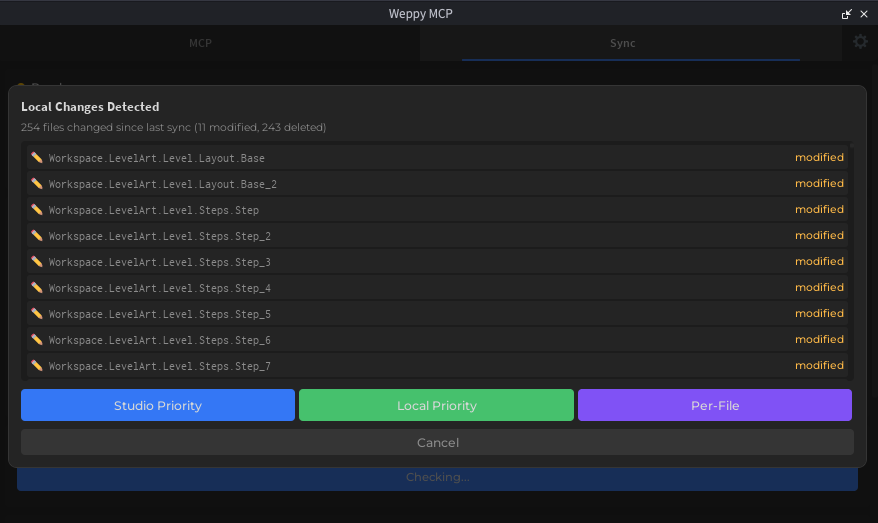
- Studio Priority: Overwrite using Studio as the source of truth
- Local Priority: Apply local files to Studio
- Per-File: Choose which side takes priority for each file individually
4) Recovery When Something Goes Wrong
- Use
historyto trace recent changes - Use
read_fileto inspect the file you need - Apply the recovered content with
write_fileand re-verify the Studio state
File Format (v2 Nested Directory)
Each Roblox instance is stored in its own directory with meta files inside it:
explorer/
├── Workspace/
│   ├── _tree.json
│   ├── Part/
│   │   └── Part.props.json
│   ├── MyScript/
│   │   └── MyScript.server.luau
│   └── Coins/
│       └── Coins.value.json
Naming conventions:
- Properties:
{Name}/{Name}.props.json - Scripts:
{Name}/{Name}.server.luau/.client.luau/.module.luau - Values:
{Name}/{Name}.value.json
Instances with the same name get a ~N suffix on their directory to distinguish them (e.g., Part~2/Part.props.json).
If a name contains ~, it is escaped as ~~ (e.g., Part~2 → Part~~2/). Odd-Count Tilde Rule: a trailing ~+N is interpreted as a collision suffix only when the number of tildes is odd.
luau-lsp Integration
WEPPY Sync can automatically generate the sourcemap file required by luau-lsp, so you get Roblox-aware editor features without setting up a separate Rojo project.
After a Full Sync completes, WEPPY generates the following files:
- Place sourcemap:
weppy-project-sync/place_<id>/sourcemap.json - Root canonical file:
weppy-project-sync/sourcemap.json
With luau-lsp reading the WEPPY sourcemap, you get improvements to:
game.*autocompletion- Navigation based on synced scripts
requireresolution across synced scripts
Recommended Setup
- Run a Full Sync once so WEPPY creates
weppy-project-sync/sourcemap.json. - Point the
luau-lspsourcemap setting in your editor toweppy-project-sync/sourcemap.json. - If your client allows disabling automatic Rojo generation, set
luau-lsp.sourcemap.autogeneratetofalse.
VSCode settings example:
{
  "luau-lsp.sourcemap.enabled": true,
  "luau-lsp.sourcemap.autogenerate": false,
  "luau-lsp.sourcemap.sourcemapFile": "weppy-project-sync/sourcemap.json"
}
weppy-project-sync/sourcemap.json follows the current representative place in the project. To pin it to a specific place, configure luau-lsp to point directly to that place’s weppy-project-sync/place_<id>/sourcemap.json.